SPA Installation Guide
Sunday, July 19, 2026 - 2 comments

Configuration is the process of setting up the School Performance Accelerator (SPA) software to ensure it operates efficiently and aligns with the specific needs of the school. Proper configuration allows administrators to manage institutional identity, schedules, and operational parameters effectively.
SPA configuration is divided into two primary areas: Settings and School Activities.
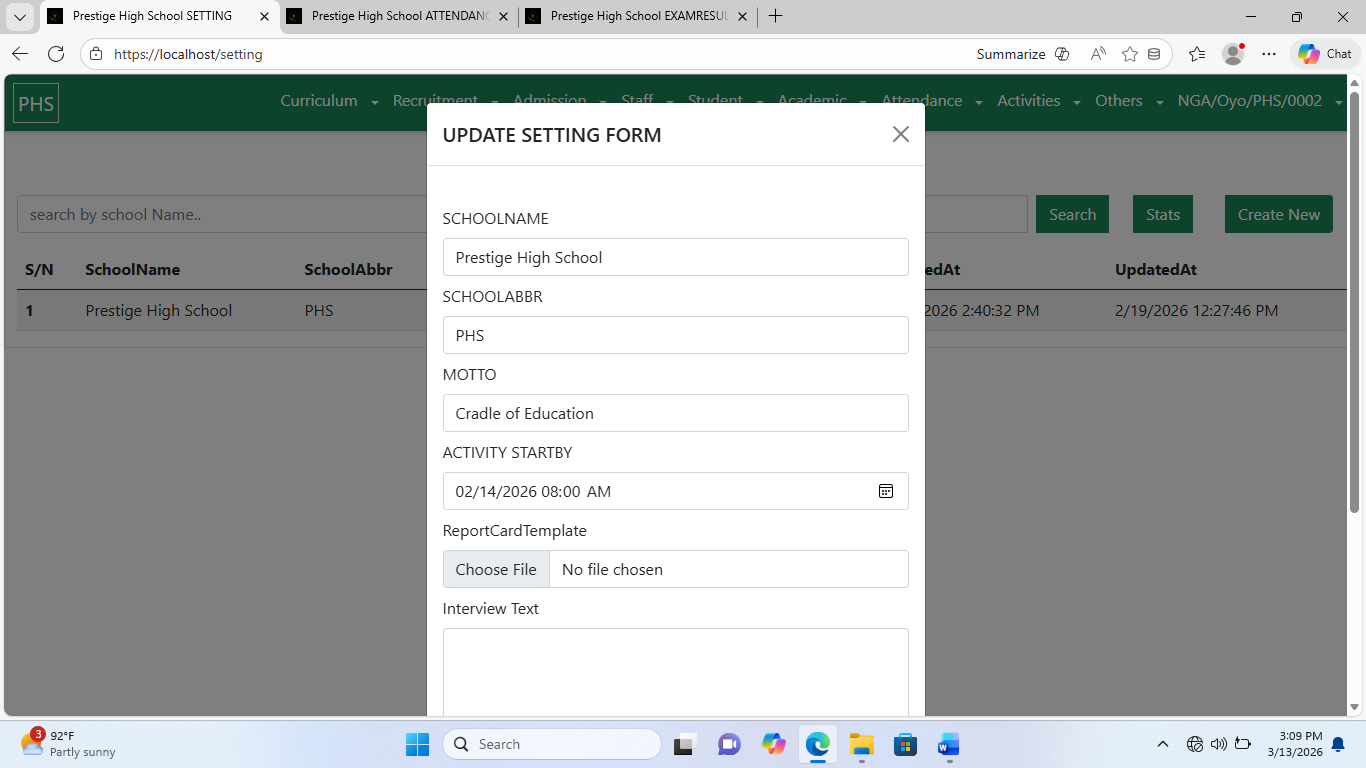
The Settings section allows you to configure the fundamental aspects of your school’s identity and communication preferences.
Configurable Items Include:
School Name – Official name of the school
School Abbreviation – Short form used in reports and communications
Motto – School slogan or guiding principle
Activity Start By – Default starting time for school activities
Report Card Template – Format for generating student report cards
Interview Text – Message sent to applicants scheduled for interviews
Steps to Configure Settings in SPA:
Navigate to Dashboard → Others → Settings.
Click Create New to open the configuration form.
Fill in the required information for all fields.
Click Create Settings to save and activate the configuration.
This ensures that all automated communications, report generation, and operational parameters reflect the school’s official identity and preferences.
The School Activities configuration manages key academic scheduling details, including the timeline of academic sessions and report card updates.
Configurable Items Include:
End of Academic Activities Date – Marks the conclusion of the current academic session
Next Academic Session Date – Prepares the system for the upcoming academic year
Steps to Update School Activities in SPA:
Navigate to Dashboard → Others → SchoolActivities.
Select the activity entry you wish to update from the list.
Modify the relevant dates or information.
Click Update SchoolActivities to save changes and apply updates to report card and academic schedules.
This configuration ensures that academic operations, report card generation, and session management remain synchronized with the school calendar.
Proper configuration of SPA lays the foundation for smooth digital management, aligning the system with the school’s operational schedule, identity, and administrative processes.
Comments